The rapid evolution of computer hardware often leads to confusion regarding component interchangeability, particularly for procurement officers and system integrators managing diverse inventories. A frequent query in the supply chain involves whether memory modules are universal across different form factors. Specifically, understanding if a laptop RAM can be used in a desktop environment is crucial for maintaining inventory accuracy and avoiding costly return rates. This analysis delves into the physical and electrical distinctions that separate these form factors, providing a comprehensive guide for wholesale buyers and custom PC builders. By addressing these compatibility issues, businesses can better optimize their sourcing strategies for the 2025 and 2026 markets.
1. Can a Laptop RAM Be Used in a Desktop? Understanding Physical Size and Compatibility
1.1 Why SO-DIMM and DIMM Form Factors Are Distinct
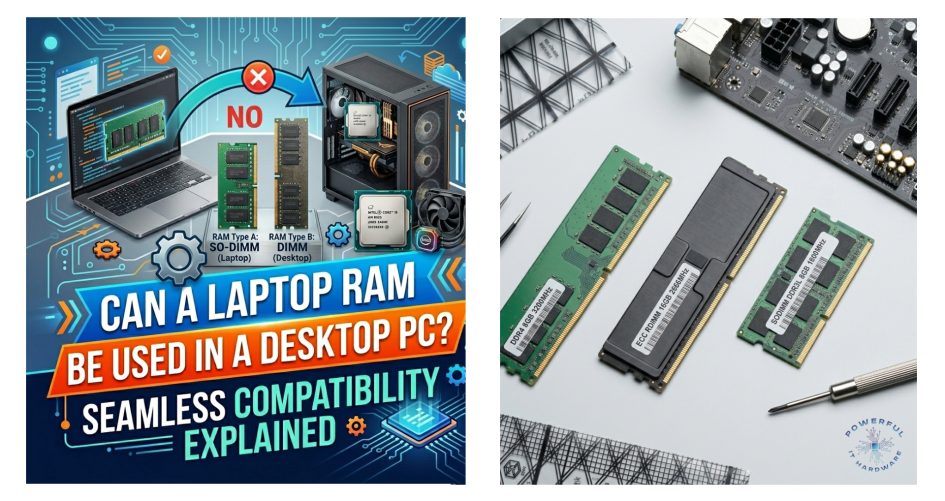
The fundamental difference between laptop and desktop memory lies in their physical design, specifically tailored to the spatial constraints of their respective chassis. Laptop memory, known as Small Outline Dual In-Line Memory Module (SO-DIMM), is roughly half the width of a desktop Dual In-Line Memory Module (DIMM). This compact design is essential for the slim profiles of modern notebooks, whereas desktop motherboards offer ample space for full-sized modules. For wholesale buyers, recognizing this distinction is the first step in preventing sourcing errors.
The physical incompatibility means that attempting to answer whether a laptop RAM can be used in a desktop setup results in an immediate negative due to the slot size difference. Consequently, inventory management systems must strictly categorize these SKUs to ensure fulfillment accuracy.
1.2 How Connector Pin Layouts Prevent Cross-Installation
Beyond the width of the module, the connector pin layouts are engineered differently to physically block incorrect installation, thereby protecting sensitive circuitry. The “notch” location on a SO-DIMM does not align with the keying of a standard DIMM slot, making it impossible to insert laptop memory into a desktop motherboard without causing damage. This deliberate design choice serves as a safeguard against improper voltage and signal routing. For businesses involved in the customization of computer systems, this physical barrier simplifies the assembly process by reducing the risk of human error during component installation.
When procurement teams ask if a laptop RAM can be used in a desktop context, the physical notch is the definitive, non-negotiable answer. Ensuring that technicians and assembly lines are equipped with the correct form factors is vital for operational efficiency.
1.3 Which Design Constraints Limit Interchangeability
The engineering constraints behind memory form factors are driven by thermal management and signal integrity requirements unique to each environment. When people ask, “can a laptop ram be used in a desktop,” they often overlook the major physical and thermal differences between the two module types. Desktop DIMMs often include higher heat spreaders to dissipate the heat generated by high-performance modules, which is a space luxury not available in compact laptop designs. Conversely, laptop RAM is built for lower power consumption to preserve battery life, influencing its physical density and component placement.
These design constraints explain why the answer to “can a laptop ram be used in a desktop” is usually more complicated than it appears. Even if an adapter existed to bridge the size gap, the thermal and operational profiles would remain mismatched. For wholesale distributors, understanding these underlying engineering principles helps in educating clients who frequently wonder, “can a laptop ram be used in a desktop” without considering voltage, cooling, and motherboard limitations. It reinforces the necessity of distinct product lines for mobile and stationary computing solutions. Ultimately, knowing whether can a laptop ram be used in a desktop depends on both hardware compatibility and performance reliability.
1.4 Why Wholesale Inventories Must Strictly Separate SKUs
Maintaining a strict separation between SO-DIMM and DIMM stock-keeping units (SKUs) is critical for minimizing returns and maximizing customer satisfaction in the B2B sector. Confusion in the warehouse regarding whether a laptop RAM can be used in a desktop PC can lead to significant financial losses due to restocking fees and shipping costs. Furthermore, as the market moves toward specialized custom builds, the demand for precise component matching increases. Distributors must implement rigorous quality control measures to ensure that the correct form factors are shipped to system integrators. This separation also facilitates better forecasting for the different demand cycles of laptop versus desktop upgrades, which often follow different market trends.
2. How Voltage and Electrical Standards Impact Usage
2.1 How Voltage Requirements Differ Between Architectures
Electrical specifications serve as another major barrier when considering the question, “can a laptop ram be used in a desktop.” Historically, laptop memory modules operate at lower voltages compared to their desktop counterparts to conserve energy and reduce heat output. For instance, while standard DDR3 desktop RAM typically runs at 1.5V, laptop DDR3 often operates at 1.35V (DDR3L). These differences are one of the key reasons why many users ask, “can a laptop ram be used in a desktop” before attempting an upgrade.
Plugging a lower voltage module into a slot expecting higher voltage—ignoring the physical incompatibility for a moment—could result in the module not receiving enough power to function stably. Conversely, forcing higher voltage into a component designed for efficiency poses a severe risk of permanent damage. This is another important factor to consider when evaluating can a laptop ram be used in a desktop system safely and effectively.
For procurement specialists, verifying voltage compatibility is as important as checking the physical form factor when sourcing bulk memory. Understanding these technical differences helps businesses explain to customers why the answer to “can a laptop ram be used in a desktop” is not always straightforward and depends heavily on motherboard and RAM specifications.
2.2 Why Mismatched Power Delivery Risks Hardware Failure
The risk of hardware failure extends beyond the memory module itself to the motherboard and the power supply unit (PSU). Many users searching “can a laptop ram be used in a desktop” are unaware that desktop motherboards are configured to deliver specific current loads to the RAM slots, optimized for standard DIMM electrical loads. Introducing a component with different resistance and power characteristics, even if physically possible via an adapter, could destabilize the motherboard’s voltage regulator modules (VRM).
In a wholesale context, supporting clients who attempt non-standard configurations after asking “can a laptop ram be used in a desktop” can lead to increased warranty claims and damage to brand reputation. Therefore, it is imperative to clarify that can a laptop ram be used in a desktop is not just a question of physical size, but also one of electrical safety and long-term system reliability.
Educating buyers on these electrical nuances prevents catastrophic failures in custom-built rigs. Understanding the technical limitations behind can a laptop ram be used in a desktop helps consumers make safer upgrade decisions while protecting the longevity of the entire system.
2.3 Which Generational Protocols Ensure Stability
Memory generations such as DDR3, DDR4, and DDR5 have distinct protocols and signaling voltages that are non-interchangeable. Many users asking “can a laptop ram be used in a desktop” often assume that matching DDR generations automatically guarantees compatibility. A common query involves whether a DDR3 RAM used in older laptops can be repurposed for legacy desktop upgrades. While the underlying technology might be similar, the electrical handshake and frequency timings are tuned for the specific controller on the motherboard.
Market data from 2025 indicates a persistent niche for legacy hardware, yet the compatibility rules remain rigid. This is why the question “can a laptop ram be used in a desktop” requires more than just checking the RAM generation. Wholesale suppliers must ensure that their listings clearly differentiate between generations and form factors to assist buyers in navigating these complex specifications.
Understanding these protocols helps businesses provide accurate technical support to their clients, especially when customers repeatedly ask, “can a laptop ram be used in a desktop” for older systems and custom PC builds. Proper education about compatibility standards ensures stable system performance across various product lines and clarifies why can a laptop ram be used in a desktop depends on multiple technical factors.
2.4 Why Customized Builds Require Precise Voltage Matching
For businesses offering customized PC solutions, precision in component selection is the hallmark of a reliable service provider. Clients seeking high-performance workstations or quiet office setups require memory that matches their specific power and thermal envelopes. Using incorrect voltage memory can lead to system instability, blue screens, and data corruption, all of which are detrimental to a B2B service provider’s credibility. As the industry trends toward more energy-efficient computing in 2026, the emphasis on precise power matching will only grow. Suppliers must stock a wide range of voltage-specific modules to cater to these bespoke customization needs, ensuring that every build meets the exacting standards of professional users.
3. Which Legacy Markets Drive Demand for Older Specs
3.1 Why DDR3 Technology Remains Relevant in 2025
Despite the advent of DDR4 and DDR5, there remains a robust market for DDR3 RAM used in various commercial and industrial applications. Many legacy systems in manufacturing, banking, and retail run on older architectures that do not support newer memory types. For these sectors, upgrading the entire fleet is cost-prohibitive, driving a steady demand for reliable DDR3 modules.
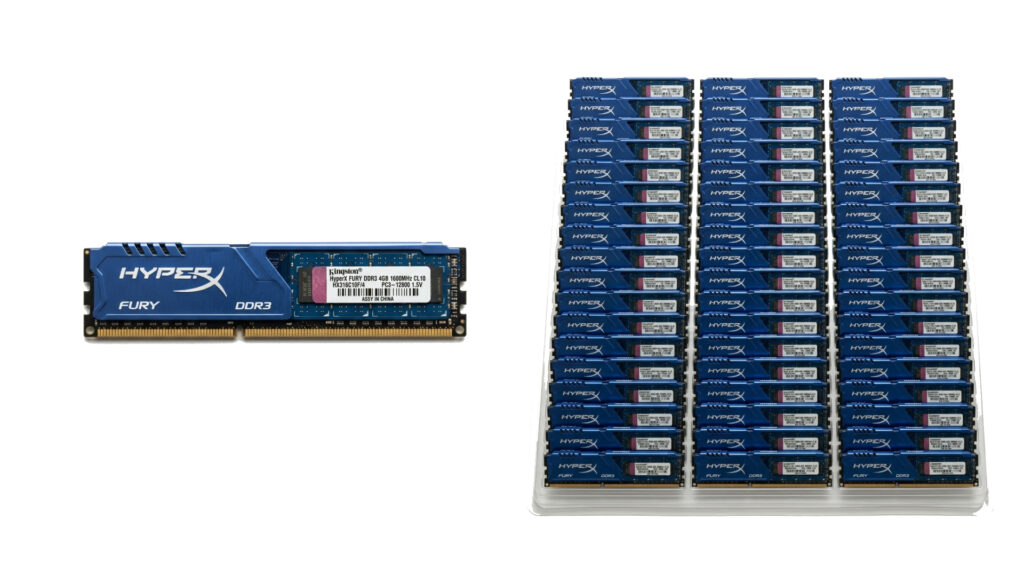
Wholesale distributors who maintain a stock of legacy components position themselves as essential partners for businesses maintaining aging infrastructure. This relevance underscores the importance of not abandoning older stock too quickly, as the install base for these systems remains significant. The continued use of DDR3 is a prime example of how diverse the hardware market is, requiring a nuanced approach to inventory management.
3.2 How the 5GB RAM Computer Segment Persists
While power users demand 16GB or more, the 5GB RAM computer segment represents a specific entry-level or upgrade niche that refuses to disappear. This configuration often results from upgrading a 4GB system with an additional 1GB module, a common practice in budget-constrained environments like education or basic administrative tasks. In developing markets or for specific IoT devices, a 5GB RAM computer offers sufficient processing power for single-purpose tasks without the expense of modern high-capacity modules. B2B buyers targeting these cost-sensitive sectors must recognize that the demand for smaller, mismatched, or legacy capacities persists. Sourcing strategies should therefore account for these lower-capacity modules to fully capture the breadth of the market.
3.3 Which Industries Utilize Refurbished and Used Components
The circular economy has given rise to a robust industry focused on the refurbishment and reuse of computer components. Sectors that do not require cutting-edge performance often turn to refurbished hardware where a DDR3 RAM used in a previous corporate machine finds a second life in a school or a small business. This market dynamic creates a sustainable revenue stream for wholesalers who deal in used or open-box components. It also aligns with global sustainability goals, reducing e-waste by extending the lifecycle of viable memory modules. Understanding which industries drive this demand allows suppliers to tailor their marketing and sales strategies effectively, highlighting both the economic and environmental benefits of buying legacy components.
3.4 How 2026 Market Forecasts Shape Procurement Strategies
Looking ahead to 2026, industry forecasts suggest a polarization in the memory market, with high-end adoption of DDR5 coexisting with a resilient tail-end demand for DDR3 and DDR4. Procurement strategies must therefore be agile, balancing the investment in next-gen technology with the steady cash flow from legacy support. Businesses that can navigate this duality will be best positioned to serve a diverse clientele ranging from gamers to industrial enterprises.
The data suggests that while the question “can a laptop ram be used in a desktop” stems from a desire to reuse components, the market reality is that distinct, purpose-sourced modules remain the standard. Strategic stockpiling of reliable older technology now will pay dividends as the supply for these components naturally dwindles over the coming years.
4. Why Direct Usage of Laptop RAM in Desktops Is Not Feasible
4.1 Why the Question “Can a Laptop RAM Be Used in a Desktop” Arises
The inquiry regarding whether a laptop RAM can be used in a desktop PC typically stems from a desire for cost savings or the repurposing of spare parts. In a B2B environment, IT departments often look for ways to utilize surplus inventory from decommissioned laptops to upgrade desktop workstations. While this is a fiscally responsible approach, the technical barriers render this strategy unviable without specialized and often expensive adapter hardware. For wholesalers, this represents an opportunity to educate the market on the value of purchasing the correct desktop modules rather than attempting risky workarounds. Addressing this question head-on helps in setting realistic expectations for clients looking to optimize their IT budgets through component recycling.
4.2 How Adapter Solutions Fail to Meet Commercial Standards
While hobbyist markets may offer DIY adapters to physically fit SO-DIMMs into DIMM slots, these solutions rarely meet commercial reliability standards. These adapters can introduce signal latency, electrical noise, and physical instability, all of which are unacceptable in a professional business environment. For a company building systems for clients, relying on such adapters voids manufacturer warranties and introduces a significant point of failure. The potential cost savings are quickly negated by the increased risk of downtime and technical support. Consequently, professional system integrators avoid these adapters entirely, opting instead for native desktop memory that guarantees compatibility and performance.
4.3 Which Performance Bottlenecks Occur with Forced Compatibility
Even if a workaround successfully allows a system to boot, forced compatibility invariably leads to performance bottlenecks. Laptop memory is often tuned for lower latency and power efficiency rather than the raw bandwidth and speed prioritized in desktop modules. Using a laptop module in a desktop environment, even theoretically, could constrain the system’s ability to multitask or process data-intensive workloads efficiently. In a wholesale context, selling a solution that hampers system performance is counterproductive to building long-term customer relationships. Buyers must be advised that the performance differential justifies the investment in proper desktop-grade RAM, ensuring that the final system delivers the expected throughput and responsiveness.
4.4 Why Reliable Sourcing Avoids Improper Configurations
Reliable sourcing strategies prioritize the integrity of the final build over short-term component savings. The complexity of modern memory architectures means that there is no one-size-fits-all solution, reinforcing that a laptop RAM cannot be used in a desktop PC in a professional setting. Wholesale partners play a pivotal role in guiding their clients toward the correct SKUs, leveraging their expertise to prevent specification mismatches. By maintaining a catalog that clearly delineates mobile versus desktop components, suppliers help their B2B clients avoid the pitfalls of improper configuration. This commitment to accuracy builds trust and positions the supplier as a knowledgeable authority in the computer hardware industry.
Conclusion
Navigating the complexities of memory compatibility requires a deep understanding of both physical constraints and electrical specifications. While the temptation to cross-utilize components like laptop RAM in desktops is understandable from a cost perspective, the technical realities make it an unfeasible strategy for professional applications. The market for 2025 and beyond demands precision, with distinct needs ranging from high-performance DDR5 setups to stable legacy systems utilizing DDR3.
By adhering to strict compatibility standards and avoiding improper workarounds, businesses can ensure the reliability and longevity of their hardware investments. For wholesalers and custom builders, the key to success lies in expertly guiding clients toward the right components, ensuring every system is optimized for its intended purpose without compromising on performance or stability.
Frequently Asked Questions
1. Can a laptop RAM be used in a desktop PC directly?
No, a laptop RAM cannot be used in a desktop PC directly due to distinct physical and electrical incompatibilities. Laptop memory uses the SO-DIMM (Small Outline Dual In-Line Memory Module) form factor, which is approximately half the width of the DIMM (Dual In-Line Memory Module) standard used in desktops. The connector notches are placed differently, physically preventing the module from fitting into the desktop slot. Furthermore, even if an adapter were used, the voltage and signal timings are tuned for mobile architecture, making direct usage unfeasible and risky for professional hardware setups.
2. Why do laptop and desktop RAM modules have different physical sizes?
The difference in physical size, specifically the SO-DIMM versus DIMM form factors, is driven by the spatial constraints of the devices they power. Laptops require compact components to fit into slim chassis, necessitating the smaller SO-DIMM design. Desktops, with larger motherboards and cases, utilize full-sized DIMMs which allow for better heat dissipation and easier handling during assembly. For wholesale buyers, understanding this distinction is crucial to avoid inventory mix-ups, as the physical incompatibility ensures that mobile memory cannot serve as a substitute for desktop modules in standard builds.
3. How do voltage requirements prevent using laptop memory in desktop systems?
Voltage requirements act as a critical barrier because laptop RAM is generally engineered for lower power consumption to extend battery life, often operating at 1.35V or lower, while desktop memory typically runs at higher voltages like 1.5V or more. A desktop motherboard is designed to deliver a specific current to the RAM slots; introducing a low-voltage module can result in instability, while forcing high voltage into a low-voltage component risks permanent hardware damage. This electrical mismatch reinforces why the question of whether a laptop RAM can be used in a desktop environment must always be answered negatively to ensure system reliability.
4. Why is DDR3 RAM still relevant for wholesale markets in 2025?
Despite the prevalence of newer generations, a significant install base of legacy systems in industrial, banking, and educational sectors continues to drive demand for DDR3 RAM used in older machines. These organizations often find it cost-prohibitive to overhaul entire infrastructure fleets, preferring to maintain existing hardware with reliable, legacy components. Wholesale distributors who stock these older specifications cater to a resilient refurbishment market, providing essential parts that extend the lifecycle of functional equipment without the need for a complete system replacement.
5. Which market segments still demand a 5GB RAM computer configuration?
The specific demand for a 5GB RAM computer configuration often arises in budget-sensitive sectors or specialized entry-level applications, such as basic administrative kiosks, educational tools, or light-use POS systems. This unusual capacity usually results from upgrading a base 4GB system with an additional 1GB module to meet the minimum requirements for specific lightweight software. While the general market has moved toward higher capacities, B2B suppliers serving cost-constrained markets must still accommodate these niche, lower-capacity requests to provide comprehensive procurement solutions.
6. Are adapters a viable solution for using laptop RAM in desktop motherboards?
While hobbyist adapters exist that physically bridge the size gap between SO-DIMM and DIMM slots, they are not viable solutions for commercial or professional applications. These adapters can introduce signal latency, electrical noise, and physical instability, all of which compromise system integrity and violate manufacturer warranties. For businesses building reliable custom PCs, relying on such workarounds creates a significant point of failure and technical liability, making native desktop memory the only professional choice for ensuring long-term stability and performance.
7. How should wholesale distributors manage inventory for SO-DIMM and DIMM modules?
Wholesale distributors must maintain strictly separated inventory for SO-DIMM and DIMM modules to minimize fulfillment errors and return rates. Since a laptop RAM cannot be used in a desktop PC, mixing these SKUs can lead to significant operational inefficiencies and customer dissatisfaction. Implementing rigorous categorization and clear labeling systems helps procurement teams and system integrators quickly identify the correct form factor. This separation is essential for accurate forecasting and ensuring that clients receive the exact components required for their specific mobile or stationary computing projects.
8. Which trends will shape the memory sourcing strategy in 2026?
Industry forecasts for 2026 suggest a polarization in the memory market, with high-performance sectors aggressively adopting DDR5 while legacy and cost-sensitive markets maintain a steady demand for DDR3 and DDR4. Successful sourcing strategies will need to balance investments in next-generation technology with the continued availability of older, reliable standards. Suppliers who can navigate this duality will be best positioned to serve a diverse client base, ensuring that they can meet the needs of both cutting-edge custom builds and the maintenance of existing IT infrastructure.
9. Why does using incompatible memory form factors affect system performance?
Using incompatible memory form factors, even with physical adapters, negatively impacts system performance due to mismatched latency timings and signal integrity issues. Laptop memory is optimized for power efficiency rather than the raw bandwidth and speed required by desktop workstations. Forcing a module to operate outside its intended design envelope creates bottlenecks that reduce data throughput, causing system lag and potential crashes. In a professional B2B context, ensuring that memory matches the motherboard’s native specifications is vital for delivering the high-performance stability that clients expect.
10. Why is precise component matching critical for customized PC builds?
Precise component matching is critical for customized PC builds because it guarantees system stability, thermal efficiency, and warranty validity. Custom builders are often tasked with creating machines for specific professional workflows, where hardware failure can result in costly downtime. Using the correct memory form factor and voltage—rather than attempting to see if a laptop RAM can be used in a desktop context—ensures that the system operates within its designed parameters. This attention to detail reinforces the builder’s reputation for quality and reliability, which is paramount in the competitive B2B customization market.