1. Why is RAM Critical for Modern Computing Performance in 2025?
Random Access Memory (RAM) serves as the beating heart of any computer system, acting as the immediate workspace where the processor accesses data for active tasks. As software applications become increasingly resource-intensive, the demand for higher capacity memory has skyrocketed. According to 2025 industry data, the average RAM requirement for business workstations has increased by 40% compared to previous years, driven largely by the proliferation of complex multitasking and virtualization needs. Ensuring that a system has adequate memory is no longer just a luxury but a fundamental necessity for maintaining operational efficiency and preventing system bottlenecks that can derail productivity.
The rise of Artificial Intelligence (AI) and machine learning integration in daily business operations has further underscored the importance of robust memory configurations. Modern applications, particularly those used in data analysis, graphic design, and financial modeling, leverage AI algorithms that require substantial memory bandwidth to function smoothly. A system with insufficient RAM will struggle to keep these data-heavy processes in the fast-access memory, resulting in frequent swapping to the slower hard drive or SSD. This degradation in performance not only frustrates users but also significantly extends the time required to complete critical tasks, directly impacting the bottom line for businesses.
For organizations managing large fleets of computers, understanding the nuances of memory performance is vital for strategic asset management. High-performance RAM ensures that virtual desktop infrastructures (VDIs) and cloud-based workspaces operate seamlessly, allowing employees to switch between resource-heavy applications without latency. Market insights for 2026 project a continued surge in memory requirements as operating systems and software platforms evolve to support more sophisticated features. Consequently, businesses that proactively upgrade their RAM capacity are better positioned to leverage emerging technologies, ensuring their infrastructure remains agile and capable of supporting future growth.
From a wholesale and customization perspective, standardizing RAM specifications across an organization can lead to significant economies of scale and simplified maintenance protocols. By procuring memory modules in bulk that are tailored to specific performance needs, companies can ensure uniform hardware reliability while reducing the total cost of ownership. Custom memory solutions allow for precise matching with motherboard specifications, optimizing compatibility and extending the lifespan of existing hardware. This strategic approach to procurement not only maximizes performance but also minimizes e-waste by delaying the need for complete system replacements, aligning with broader corporate sustainability goals.
2. How Can I Get More RAM on My PC: Assessing Needs and Availability
The process of upgrading memory begins with a thorough assessment of the current system configuration and the specific requirements of the intended workload. Determining how can I get more RAM on my pc involves checking the motherboard’s specifications to understand the maximum capacity supported, the number of available slots, and the type of memory required, such as DDR4 or the increasingly prevalent DDR5. System diagnostic tools readily available in 2025 can automatically scan the hardware and provide a detailed report on current usage and available upgrade paths. This initial step is crucial to avoid the common pitfall of purchasing incompatible memory modules, ensuring that any investment in hardware yields the desired performance improvement.
Once the technical constraints are identified, the next logical step involves evaluating the specific usage scenarios that the computer is expected to handle. For general office productivity, a standard 16GB upgrade might suffice, but for high-end computing tasks like 3D rendering or video editing, 64GB or more may be necessary. Businesses must look beyond the immediate needs and consider future software requirements to ensure longevity. By forecasting these needs, companies can make informed decisions about whether to simply fill existing slots or to replace lower-capacity modules with higher-density ones. This foresight prevents the need for frequent, incremental upgrades, thereby reducing administrative overhead and disruption to workflow.
Procurement strategies play a pivotal role in the upgrade process, especially for businesses looking to scale their operations efficiently. Engaging with wholesale suppliers offers access to a wider range of memory modules, often at significantly reduced price points compared to retail purchasing. Wholesale channels frequently offer customization options, such as specific heat spreaders for better thermal management or branded modules that align with corporate identity. Establishing a direct relationship with manufacturers or authorized distributors ensures access to the latest memory technologies as soon as they hit the market. This access is critical for maintaining a competitive edge, particularly in technology-sensitive sectors where hardware capabilities directly correlate with service delivery.
Finally, the physical installation and subsequent verification of the upgrade are essential steps to guarantee system stability. While installing RAM is generally straightforward, ensuring that the modules are seated correctly and recognized by the BIOS is vital for avoiding intermittent errors. For large-scale rollouts, utilizing professional installation services can mitigate the risk of hardware damage and ensure that all systems are configured identically. Post-installation, rigorous stress testing should be conducted to validate the performance gains and ensure that the new memory operates flawlessly under load. This methodical approach to upgrading ensures that the question of how can I get more RAM on my pc is answered not just with a purchase, but with a comprehensive, performance-driven solution.
2.1 How Can I Check My Current RAM and Upgrade Limits?
Checking the current memory status of a computer is a straightforward process that can be accomplished using built-in operating system tools or third-party diagnostic software. In Windows, the Task Manager provides a real-time view of memory usage, including speed, slot count, and form factor, which serves as the baseline for any upgrade planning. For a more granular analysis, tools like CPU-Z offer detailed insights into the motherboard’s chipset and the specific timings of the installed modules. Understanding these parameters is the first step in answering how can I get more RAM on my pc, as it reveals the headroom available for expansion and the specific type of memory required for a successful upgrade.
Understanding the motherboard’s limitations is equally important to prevent incompatibility issues. Motherboards have a maximum memory capacity dictated by the controller and the physical number of DIMM slots available. For instance, a board with four slots might support a maximum of 128GB, but this is dependent on the density of the individual modules available in the market. 2025 market trends show a shift towards higher-density modules, meaning that older motherboards might now support larger capacities than originally documented thanks to firmware updates. Therefore, consulting the manufacturer’s latest documentation or support forums is advisable to determine the absolute upper limit of the system’s potential.
For businesses managing diverse hardware inventories, automated asset management tools can streamline the process of checking upgrade capabilities across hundreds of machines. These tools scan the network and compile detailed reports on the hardware specifications of every connected device, highlighting which units are candidates for memory upgrades. This centralized visibility is invaluable for planning bulk procurement strategies, allowing IT departments to standardize configurations across the organization. By identifying exactly which systems can be upgraded and by how much, companies can prioritize their spending and extend the lifecycle of their existing assets rather than resorting to costly wholesale hardware replacements.
The physical inspection of the computer internals, while more invasive, provides the most definitive confirmation of available resources. Opening the case allows one to visually confirm the number of empty slots and the type of RAM already installed, ensuring that the new modules will physically fit and electrically match. This step is particularly relevant for custom-built PCs or industrial systems where documentation may be scarce. Verifying the form factor—whether DIMM for desktops or SO-DIMM for small form factor systems—is critical to avoid purchasing errors. This hands-on verification complements the software analysis, providing a holistic view of the system’s upgrade potential.
2.2 Which Factors Influence the Choice Between OEM and Custom RAM Modules?
The decision between Original Equipment Manufacturer (OEM) memory and custom, third-party modules often hinges on a balance between cost, performance, and warranty considerations. OEM modules are typically designed for basic reliability and are often the default choice for standard office builds due to their lower cost and widespread availability. However, they may lack the enhanced heat dissipation features or optimized timings found in custom or enthusiast-grade memory. For businesses where downtime is not an option, investing in high-quality custom modules can provide greater stability under load, reducing the likelihood of memory-related errors that could interrupt critical business operations.
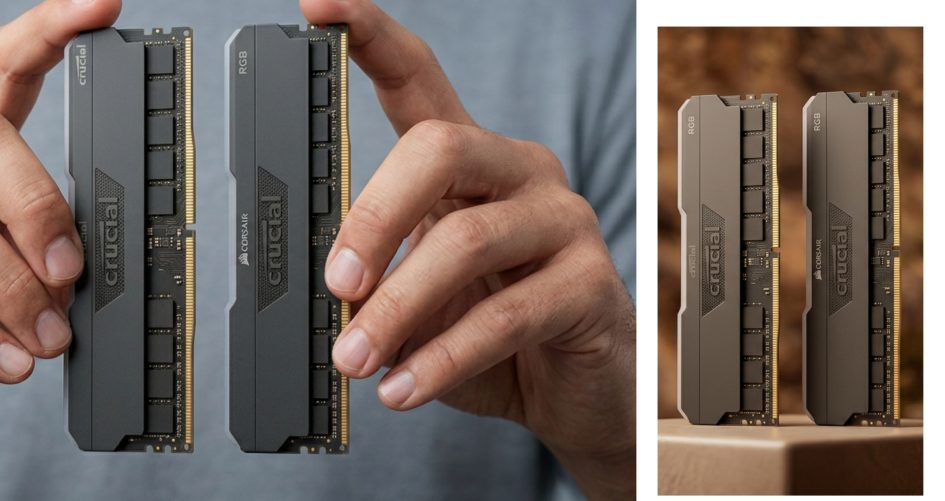
Custom RAM modules offer a distinct advantage in terms of scalability and feature sets that are tailored to specific professional workflows. Manufacturers of custom memory often provide modules with tighter timings, lower latency, and higher data transfer rates, which are essential for tasks such as real-time data processing or high-frequency trading. Furthermore, custom modules often come with robust heat spreaders or even active cooling solutions, which are becoming increasingly important as memory speeds push the physical limits of the technology. In 2025, the premium for these high-performance modules has decreased, making them a viable option even for cost-conscious businesses looking to maximize the efficiency of their hardware.
From a wholesale and customization perspective, sourcing memory directly allows for specific branding and serialization requirements to be met. Large enterprises often require custom firmware on their memory modules to support specific security protocols or to integrate seamlessly with proprietary management software. Wholesale suppliers can accommodate these requests, providing bespoke solutions that off-the-shelf OEM parts simply cannot offer. This level of customization ensures that the hardware is perfectly aligned with the organization’s IT governance policies, providing an additional layer of control and security over the computing environment.
Warranty support and supply chain reliability are also critical factors that influence this decision. Custom memory vendors often provide superior warranty terms, including lifetime warranties and advance replacement services, which minimize downtime in the event of a failure. In contrast, OEM warranties are typically tied to the system purchase and may be more difficult to claim without the original hardware context. For 2026 planning, securing a supply chain that guarantees the continuity of specific memory models is vital for large-scale deployments. Wholesale agreements often lock in pricing and availability, shielding the buyer from market fluctuations and ensuring that replacement parts will be available for the foreseeable future.
3. How to Use More RAM on PC: Optimization and Virtualization Strategies
Simply installing hardware is only the first step; knowing how to use more RAM on pc effectively involves optimizing the operating system and software environment to take full advantage of the available resources. Modern operating systems are designed to manage memory dynamically, but they often default to conservative settings that may not utilize high-capacity RAM to its fullest potential. Tweaking system settings, such as disabling unnecessary startup programs and adjusting virtual memory paging files, can free up physical RAM for more demanding applications. This software optimization ensures that the expensive hardware upgrades translate directly into tangible performance gains, rather than remaining idle due to software bottlenecks.
Virtualization technology represents one of the most effective methods for utilizing large amounts of RAM. By creating virtual machines (VMs), users can dedicate specific chunks of memory to entirely different operating systems or isolated work environments on a single physical machine. This is particularly relevant for developers and testers who need to simulate various client environments without needing multiple physical computers. With the RAM capacities available in 2025, a single powerful workstation can easily host multiple VMs, each allocated 8GB to 16GB of memory, streamlining the development workflow and reducing hardware sprawl within an organization.
For creative professionals, utilizing RAM Disks is a powerful strategy to accelerate specific workflows. A RAM Disk creates a virtual drive that resides entirely in the system memory, offering read and write speeds that are orders of magnitude faster than even the fastest NVMe SSDs. By moving temporary files, cache files, or active project files onto a RAM Disk, video editors and 3D animators can drastically reduce render times and improve preview scrubbing smoothness. While data in a RAM Disk is volatile and lost upon power loss, the performance benefits for temporary processing tasks are unmatched, providing a specialized way to utilize excess memory capacity for productivity boosts.
Businesses can also leverage memory optimization software to monitor and manage allocation in real-time, ensuring that critical business applications always have priority access to resources. These tools can automatically trim the working sets of background processes or “park” unused RAM to ensure it is available when needed. Furthermore, understanding how to use more RAM on pc allows IT departments to defer hardware refresh cycles. By optimizing the utilization of existing 32GB or 64GB capacities, organizations can extend the useful life of their workstations by several years. This approach aligns with financial efficiency goals, maximizing the return on investment for every memory module deployed across the enterprise.
3.1 How Can Software Optimization Maximize Existing RAM Utilization?
Software optimization begins with a rigorous audit of the applications running in the background, many of which consume significant memory resources without adding value to the user’s current task. Bloatware, unnecessary system services, and auto-starting utilities can cumulatively consume gigabytes of RAM, effectively wasting the hardware’s potential. By deploying clean image installations and utilizing endpoint management software to restrict non-essential applications, businesses can reclaim a substantial amount of memory. This practice is essential in environments where efficiency is paramount, ensuring that every megabyte of installed memory is dedicated to revenue-generating activities rather than background processes.
Advanced memory management features within modern operating systems, such as Windows Standby List trimming or Linux memory compression, offer sophisticated ways to extend the utility of physical RAM. These features manage how data is cached and compressed, allowing the system to hold more information in memory than the physical capacity might suggest. Enabling and fine-tuning these features can provide a performance boost that feels like a hardware upgrade. For instance, configuring the system to prioritize active applications over cached background data ensures that the user interface remains snappy even under heavy load, effectively answering the question of how to use more RAM on pc through intelligent software management rather than just physical expansion.
Database management and data-heavy applications can also be configured to make better use of large memory pools. By adjusting buffer pool sizes and cache limits in database software like SQL Server or Oracle, administrators can significantly reduce disk I/O operations. Keeping more of the active database in RAM allows for near-instantaneous query responses, which is critical for customer-facing applications and business intelligence tools. As data sets grow in 2025, the ability to tune software to leverage larger memory blocks becomes a competitive differentiator, allowing companies to extract insights faster and serve customers more efficiently without necessarily upgrading their server hardware.
Regular maintenance and updates play a surprising role in memory optimization. Software developers frequently release updates that include memory leak fixes and efficiency improvements. A memory leak, where an application fails to release memory after it is no longer needed, can slowly cripple a system with high RAM capacity by exhausting available resources over time. Keeping the operating system and all applications patched ensures that the software overhead is minimized. For wholesale buyers, selecting software vendors who prioritize code efficiency and low memory footprints is becoming a key criterion in software procurement, complementing the investment in high-performance hardware.
3.2 Which Hardware Configurations Enable Maximum RAM Capacity?
Achieving maximum RAM capacity is not solely about buying the biggest sticks of memory; it requires a synergistic combination of compatible hardware components. The motherboard is the primary enabler, as its chipset and BIOS determine the upper limit of addressable memory. High-end desktop platforms and server-grade motherboards are designed to support capacities that far exceed consumer needs, often reaching into the terabytes. Businesses looking to deploy workstations for data science or virtualization must prioritize these high-capacity platforms. Investing in a motherboard with eight or more memory slots provides the scalability needed to upgrade incrementally as requirements grow, future-proofing the hardware investment.
The Central Processing Unit (CPU) also plays a critical role in memory capacity, as the integrated memory controller resides within the processor itself. Different CPU architectures support different memory types and maximum capacities per channel. For example, workstation-class CPUs often support Error Correction Code (ECC) memory, which is essential for data integrity in mission-critical applications. When planning for maximum capacity, selecting a CPU that supports multi-channel memory access (quad-channel or octa-channel) is crucial. This configuration not only increases capacity but also multiplies the memory bandwidth, eliminating bottlenecks that would otherwise limit the performance of high-speed RAM modules.
Memory modules themselves have evolved, with technologies like DDR5 offering higher densities and better power efficiency than their predecessors. In 2025, single-module capacities of 64GB and higher are becoming commercially viable and affordable. When building for maximum capacity, utilizing these high-density modules allows for filling up motherboard slots without running out of physical space. However, stability can sometimes be an issue when populating all slots at maximum speed. Therefore, custom BIOS configurations provided by motherboard manufacturers—often accessible through wholesale partnerships—are essential to ensure that the system remains stable when pushed to its maximum memory limits.
Cooling and power supply infrastructure are often overlooked but vital components of a maximum-capacity configuration. High-density memory modules generate significant heat, especially when operating at high speeds, which can lead to thermal throttling and instability. Ensuring adequate airflow and utilizing memory cooling solutions helps maintain performance. Similarly, a robust power supply unit (PSU) is necessary to handle the transient power spikes associated with high-performance memory. Wholesale solutions that bundle matched memory, cooling, and power components provide system integrators with a turnkey solution for building ultra-high-capacity machines that are stable and reliable over long periods of intensive use.
4. How to Use Laptop RAM in PC: Adapting Memory for Cross-Platform Use
The physical form factor difference between laptop and desktop memory has historically been a significant barrier to interoperability. Laptop memory, known as SO-DIMM (Small Outline Dual In-Line Memory Module), is physically smaller and designed to fit into the tight confines of a portable chassis. Desktop memory, or DIMM, is larger and optimized for heat dissipation and ease of handling in larger cases. The question of how to use laptop ram in pc typically arises from users attempting to repurpose old laptop parts or IT managers looking to standardize inventory. While direct compatibility is rare due to these physical differences, understanding the technical distinctions helps in planning inventory and managing spare parts effectively.
Despite the physical differences, the underlying technology of SO-DIMM and DIMM is often identical, meaning they operate on the same electrical principles and data protocols. This similarity is what makes the concept of cross-platform use theoretically possible. In specialized industrial computing scenarios, such as embedded systems or compact industrial PCs, motherboards are designed to accept SO-DIMM modules specifically to save space. For custom system builders, this presents an opportunity to use laptop memory in non-laptop enclosures, provided the motherboard supports it. This niche application is valuable for building silent, low-power home servers or media centers where the smaller size of the SO-DIMM is actually a benefit for airflow and layout.
The primary challenge when attempting to adapt laptop memory for desktop use lies in the physical interface. Adapters that convert SO-DIMM slots to DIMM slots do exist in the market, though they are often considered specialty items. These adapters allow a SO-DIMM module to be inserted into a standard desktop DIMM slot, effectively bridging the form factor gap. However, these solutions come with caveats regarding signal integrity and height clearance. In a wholesale environment, stocking these adapters can be a value-added service for clients who need to deploy mixed hardware environments, though it is generally recommended to use native memory modules for the most reliable and stable performance.
For 2025 and beyond, the market trend suggests a blurring of lines between form factors as Mini-PCs and Small Form Factor (SFF) desktops gain popularity. These systems often utilize laptop components, including SO-DIMM RAM, to achieve their compact footprints. Consequently, managing inventory for these devices requires a shift in procurement strategy. Rather than viewing laptop and desktop RAM as entirely separate categories, IT procurement managers should view them as part of a unified memory ecosystem. Wholesale distributors that offer a wide range of both form factors enable businesses to flexibly deploy memory across various device types, optimizing their stock levels and ensuring that upgrades can be performed regardless of the device form factor.
4.1 Why Are Laptop and Desktop RAM Form Factors Generally Incompatible?
The fundamental incompatibility between laptop and desktop RAM stems from the design philosophies of portability versus expandability. Laptop RAM (SO-DIMM) is engineered to be as compact as possible to fit within the slim profiles of modern notebooks. Every millimeter of space is valuable in a laptop design, necessitating a memory module that is roughly half the width of a standard desktop module. Desktop RAM (DIMM), conversely, benefits from the generous interior space of a PC tower, allowing for a taller profile that accommodates better heat spreaders and more robust circuitry. These opposing design goals result in physically incompatible connectors that prevent accidental insertion of the wrong module type, protecting the hardware from damage.
Beyond physical size, the electrical requirements and signal routing can differ, even if the core technology (e.g., DDR4) is the same. While the voltage standards are often aligned to allow for manufacturing efficiencies, the pin layout is specifically arranged to match the memory controller of the respective platform—mobile or desktop. Attempting to force a module into an incompatible slot can result in bent pins or short circuits, causing permanent damage to the motherboard and the memory module. This strict incompatibility is a deliberate engineering choice to ensure system integrity and prevent users from inadvertently mismatching components that could lead to unstable system behavior.
However, the narrative of incompatibility is shifting with the evolution of the Mini-PC market. These compact desktop computers are increasingly adopting SO-DIMM slots to leverage the compact size and power efficiency of laptop memory. This convergence means that the distinction between “laptop” and “desktop” RAM is becoming less about the device type and more about the motherboard form factor. For businesses, this implies that when sourcing wholesale memory, the focus should shift towards the motherboard specifications rather than the broader category of the computer. A savvy procurement strategy involves stocking SO-DIMM modules that can serve dual purposes in upgrading both legacy laptops and the growing fleet of miniaturized desktop workstations.
From a cost and logistics perspective, maintaining separate inventories for SO-DIMM and DIMM can be complex for large organizations. The incompatibility necessitates precise stock management to avoid ordering errors that could halt deployment projects. However, this segmentation also allows for specialized customization. SO-DIMMs can be customized for low power consumption, extending battery life in portables, while DIMMs can be optimized for raw speed and thermal management in desktops. Understanding these distinct requirements allows wholesale buyers to tailor their purchasing strategies to the specific performance needs of their device fleets, ensuring optimal functionality for each hardware class.
4.2 How Can Adapters or Specialized Motherboards Bridge the Gap?
For those seeking practical solutions to utilize SO-DIMM modules in standard desktop environments, specialized hardware adapters offer a potential workaround. These adapters, essentially printed circuit boards with a standard DIMM edge connector on one side and SO-DIMM slots on the other, physically bridge the gap between the two form factors. While not a common solution for the average consumer, they are incredibly useful in prototyping, testing, or repurposing high-value laptop memory for desktop use. These adapters maintain the correct electrical connections, allowing the BIOS to recognize the laptop memory as if it were a standard desktop module, provided the timings and voltage are compatible with the motherboard.
Specialized motherboards represent a more elegant solution, particularly within the industrial and embedded computing sectors. Motherboards designed for industrial control, digital signage, or compact servers often feature SO-DIMM slots natively. This design choice allows system integrators to utilize the vast ecosystem of high-density laptop memory modules to build powerful, space-constrained systems. In 2025, the availability of consumer-grade motherboards with SO-DIMM support has also increased, catering to the burgeoning market of custom-built Mini-PCs. This trend effectively eliminates the need for adapters, as the platform is designed from the ground up to accept the smaller form factor, ensuring better signal integrity and reliability.
Using adapters, however, requires careful consideration of the physical layout inside the PC case. SO-DIMMs installed in an adapter may protrude or sit in a position that obstructs other components, such as CPU coolers or expansion cards. Furthermore, the adapter itself adds a small amount of latency and potential points of failure to the memory subsystem. For wholesale and industrial applications where reliability is paramount, relying on adapters is generally less desirable than using native components. However, for one-off repairs or utilizing emergency stock, they provide a versatile tool that can save time and capital expenditure by preventing the need to purchase new memory modules.
The future of memory interoperability looks towards standardization and modular design. As 2026 approaches, industry discussions are leaning towards more modular memory architectures that could theoretically allow for greater flexibility in form factors. Until such standards are universally adopted, the best approach for businesses is to standardize on platforms that offer the most flexibility. Investing in equipment that supports interchangeable memory types, or sourcing motherboards with universal slots, provides a hedge against market fluctuations. Wholesale suppliers are increasingly catering to this need by offering “hybrid” stocking options, ensuring that clients have access to both form factors and the adapter technologies needed to bridge them in urgent scenarios.
5. Why Wholesale Procurement and Customization Are Key Strategies for 2026
The landscape of IT procurement is rapidly evolving, with wholesale strategies becoming central to managing the escalating costs of hardware upgrades. As the demand for higher RAM capacity grows due to data-intensive applications, the per-unit cost of memory modules can become a significant expense for organizations. Wholesale procurement bypasses the retail markup, offering bulk pricing that scales efficiently with the size of the deployment. For 2026 planning, securing contracts with wholesale distributors is not merely a cost-saving measure but a strategic necessity to ensure budget predictability. Locking in prices for memory modules protects organizations from the volatility of the semiconductor market, ensuring that upgrade projects remain financially viable regardless of global supply chain disruptions.
Customization goes hand-in-hand with wholesale purchasing, offering businesses the ability to tailor hardware specifications to their exact operational needs. Off-the-shelf memory modules may offer generic performance profiles, but wholesale channels often provide access to custom-configured memory. This can include specific timings optimized for certain workloads, branded casings for asset tracking, or pre-testing of matched sets for server environments. In a B2B context, this level of customization ensures that the hardware performs optimally within the specific IT ecosystem of the client. It reduces the “one-size-fits-all” inefficiency, where companies pay for features they do not use, and instead directs investment toward specs that drive actual business performance.
Sustainability and lifecycle management are increasingly critical concerns for modern enterprises. Wholesale procurement facilitates better lifecycle management by ensuring a consistent supply of compatible memory modules over extended periods. When organizations need to perform incremental upgrades over several years, maintaining access to the same specific model of RAM is crucial for compatibility. Retail channels frequently cycle through stock, making it difficult to find matching modules a year or two down the line. Wholesale distributors, however, can maintain inventory or manufacturing runs of specific parts for their B2B clients. This capability supports a “repair and upgrade” culture rather than a “replace” culture, significantly reducing electronic waste and aligning with corporate social responsibility (CSR) goals.
Furthermore, the relationship between a business and a wholesale supplier can evolve into a strategic partnership that offers value beyond simple transactions. Distributors often provide early access to next-generation technologies, such as the upcoming DDR6 standards anticipated in late 2026. By working closely with manufacturers, businesses can gain insights into upcoming technological shifts and plan their hardware roadmaps accordingly. This forward-looking approach is essential for maintaining a competitive edge. Wholesale suppliers can also provide valuable data on market trends, helping businesses understand which memory specifications are offering the best ROI and which emerging technologies are poised to become the new standard.
Conclusion
Maximizing the performance of a PC through RAM upgrades requires a strategic blend of technical knowledge, smart procurement, and system optimization. From understanding the nuances of how can I get more RAM on my pc to exploring the specific use cases of how to use laptop ram in pc, the modern approach to memory upgrades transcends simple hardware installation. It involves a holistic view of the IT ecosystem, considering software optimization, hardware compatibility, and the specific needs of business workloads. As we move further into 2025 and approach 2026, the integration of wholesale buying strategies and customized solutions will become the defining factor in successful IT infrastructure management.
For businesses and IT professionals, the call to action is clear: move beyond reactive, retail-based purchasing and embrace proactive, wholesale partnerships. By leveraging bulk purchasing power and customization options, organizations can ensure they are not only meeting current performance demands but are also future-proofed against the technological advancements of tomorrow. Assess your current inventory, forecast your future memory needs based on emerging AI and data trends, and engage with suppliers who can provide the tailored, high-quality memory solutions your organization requires to thrive in a data-driven world.
Frequently Asked Questions
1. What are the primary steps to determine how can I get more RAM on my pc for an office environment?
The first step involves conducting a comprehensive hardware audit using system diagnostic tools to identify the current RAM capacity, speed, and available motherboard slots. Once the baseline is established, you must consult the motherboard or laptop manufacturer’s documentation to understand the maximum capacity and type (DDR4, DDR5) supported. For office environments, it is crucial to assess the specific software requirements of the workforce, ensuring that the planned upgrade meets the demands of multitasking and business applications. Finally, engaging with a wholesale supplier allows businesses to purchase the required modules in bulk, ensuring consistency across the fleet while optimizing costs.
2. Is it technically feasible to explore how to use laptop ram in pc, and what are the risks?
While laptop RAM (SO-DIMM) and desktop RAM (DIMM) function on similar electrical principles, they are physically incompatible due to differing form factors. However, it is technically feasible to use SO-DIMM modules in a desktop if the motherboard specifically supports laptop memory, which is common in compact Mini-PCs and industrial systems. Alternatively, specialized adapters exist to bridge the gap, though they are generally recommended only for testing rather than long-term enterprise use due to potential signal integrity issues and physical clearance problems inside standard PC cases.
3. How can businesses leverage strategies to use more RAM on pc without immediate hardware purchases?
Businesses can maximize existing resources by optimizing software settings and utilizing virtualization technologies to manage memory allocation more efficiently. This includes disabling unnecessary startup applications that consume background resources and configuring virtual memory settings to prevent system bottlenecks. Furthermore, utilizing features like RAM Disks for temporary, high-speed data processing allows companies to extract significant performance value from their current hardware. These software-based solutions are essential for deferring capital expenditures while maintaining productivity levels.
4. Why is wholesale procurement considered superior to retail for large-scale RAM upgrades?
Wholesale procurement offers significant cost advantages through volume pricing, which is critical for businesses managing large IT fleets or deployment projects. Beyond price, wholesale suppliers provide consistent stock availability, ensuring that all upgraded machines utilize identical memory modules for better stability and easier maintenance. Additionally, wholesale channels often offer access to customization options and legacy parts that retail stores cannot support. This reliability and uniformity are key for minimizing downtime and ensuring long-term hardware compatibility across an organization.
5. What are the performance implications of mixing RAM brands or speeds in a single system?
Mixing RAM brands or speeds can lead to the system defaulting to the lowest common denominator in terms of speed and timing, potentially limiting overall performance. While modern motherboards are generally flexible enough to boot with mixed modules, instability issues can arise under heavy workloads, particularly in a professional B2B environment where reliability is paramount. To ensure optimal performance and system stability, it is highly recommended to use matched sets of memory modules. Wholesale purchasing allows businesses to acquire identical batches of RAM, eliminating the risks associated with mixing disparate components.
6. How does customizing RAM specifications benefit specialized professional workflows?
Customizing RAM specifications allows businesses to tailor hardware performance to the exact needs of their specialized workflows, such as video editing, financial modeling, or CAD. Custom modules can be optimized for lower latency or higher bandwidth, and may include features like enhanced heat spreaders for systems running 24/7. For IT managers, custom solutions can also include specific branding or serialization for better asset tracking. This level of specificity ensures that the hardware investment directly translates into improved efficiency for the specific applications that drive the business’s revenue.
7. What role does BIOS configuration play when maximizing RAM capacity?
The BIOS (Basic Input/Output System) is fundamental in recognizing and correctly configuring new memory modules to their maximum potential. Upon installing new RAM, updating the BIOS to the latest version is often necessary to ensure compatibility with newer, higher-density modules that were released after the motherboard’s manufacture. Advanced BIOS settings also allow users to tweak memory timings and voltages to stabilize high-performance custom modules. For B2B deployments, ensuring a consistent BIOS version across all fleet machines is a critical step in a successful RAM upgrade strategy.
8. Can upgrading RAM reduce the total cost of ownership (TCO) for business computers?
Yes, upgrading RAM is a highly effective strategy for reducing the Total Cost of Ownership by extending the functional lifespan of existing computer fleets. Instead of purchasing entirely new machines, a memory upgrade can provide a significant performance boost, allowing older systems to run modern operating systems and resource-intensive applications smoothly. This deferment of capital expenditure allows businesses to allocate budget to other critical areas. Furthermore, keeping machines in service longer reduces e-waste and disposal costs, aligning with both financial and sustainability goals.
9. How can virtualization assist in answering the question of how to use more RAM on pc effectively?
Virtualization allows a single physical workstation to host multiple isolated operating systems or environments, effectively utilizing large pools of RAM to replace multiple physical machines. By allocating specific memory blocks to each Virtual Machine (VM), power users can run legacy applications, test software, or isolate secure environments on one device. This is particularly useful for developers and IT departments. Efficiently using RAM in this manner consolidates hardware resources, reduces power consumption, and simplifies the physical infrastructure required to support diverse business operations.
10. What are the projected trends for RAM technology in 2026 that buyers should anticipate?
Industry projections for 2026 indicate a widespread adoption of DDR6 memory, offering significantly higher speeds and improved power efficiency over current standards. Additionally, the market is moving towards higher module densities, meaning single sticks with capacities exceeding 64GB will become more affordable and accessible. Businesses should also anticipate tighter integration between memory and processors for AI-specific tasks. Preparing for these shifts involves ensuring that current wholesale procurement strategies focus on platforms that offer upgrade paths to these next-generation technologies, future-proofing the organization’s IT infrastructure.